![applauz_logo.svg]](https://www.applauz.me/hubfs/applauz_logo.svg)
Quick Facts
| Conversion rate | 11.25 points = $1 CAD |
| Minimum amount | 56.25 points ($5) |
| Maximum amount | 11,250 points ($1,000) |
| Card validity | 6 months from date of issue |
| Accepted at | Anywhere Visa is accepted — online, by phone, and in-store |
| Where to find your cards | Profile → Credit Cards |
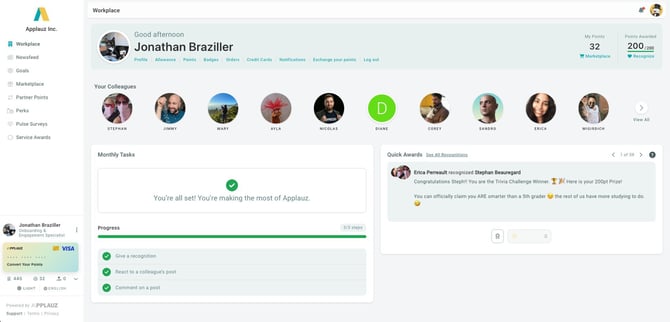
Locate the Visa Card Widget on Your Dashboard
Log in to Applauz at app.applauz.me and head to your Workplace dashboard. In the bottom-left corner of the screen, below your profile and points summary, you'll find the Visa card widget. Click on it to open the redemption panel.
Choose the Amount to Convert
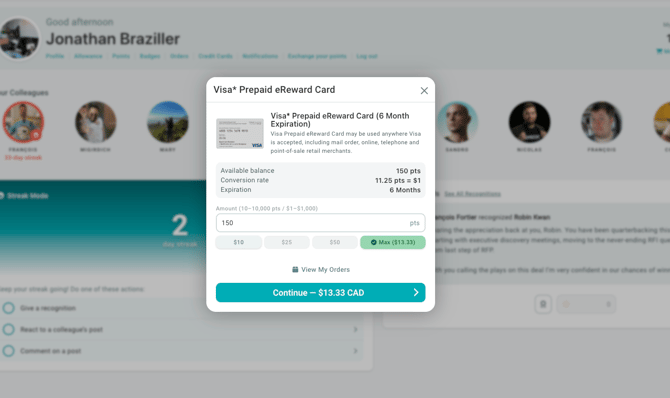
A popup will appear displaying:
- Available balance — your current redeemable point total
- Conversion rate — 11.25 pts = $1
- Card expiration — 6 months from the date of issue
Enter the number of points you'd like to convert, or use one of the quick-select buttons:
- $5 — requires 56.25 points
- $25 — requires 281.25 points
- $50 — requires 562.5 points
- Max — converts your full available balance (up to 11,250 pts / $1,000)
Confirm Your Conversion
Once you've entered a valid amount, the Continue button will turn green and display the exact CAD dollar value you're converting (for example, "Continue — $3.00 CAD"). Click it to finalize your redemption.
Receive and Use Your Visa eReward Card
After confirming, your Visa Prepaid eReward Card details will be sent to your registered email address. Your card can be used:
- Online at any retailer that accepts Visa
- In-store at point-of-sale terminals
- By phone or mail order
Frequently Asked Questions
Can I make multiple conversions?
Yes. You can convert points in multiple separate transactions. Each conversion requires a minimum of 11.25 points ($1).
What if I don't have enough points for the minimum?
You need at least 56.25 points to initiate a conversion. Continue earning points through recognitions, allowance, or completing monthly tasks, then return to redeem when you've reached the minimum.
Is the 11.25 pts = $1 rate the same for all rewards?
No — this rate applies specifically to the Visa Prepaid eReward Card. Point costs for gift cards and other Marketplace items vary by brand and product. Always check the price displayed on each item in the Marketplace before redeeming.